Your first scene
Put a camera, a sun, and a cube in the window from the last page, then write a system that spins the cube.
components: camera · light · mesh_renderer · spin_control
Vulkan
WebGPU
This page adds awake-scene-authoring to commonMain (see Installation) and
reuses GameRenderPlan from Your first window.
Build the scene
A scene is a set of ECS entities, each with components. This one has three: a camera, a directional light, and a cube. Both forms below describe the same entities. This page runs the scene DSL form; Load a scene document runs the other.
{
  "version": 1,
  "name": "first-scene",
  "nodes": [
    {
      "name": "camera",
      "components": [
        {
          "component": "camera",
          "eye": { "x": 0.0, "y": 1.5, "z": 4.0 },
          "center": { "x": 0.0, "y": 0.5, "z": 0.0 },
          "fovYDegrees": 45.0
        }
      ]
    },
    {
      "name": "sun",
      "components": [
        {
          "component": "light",
          "type": "Directional",
          "direction": { "x": 0.4, "y": 0.8, "z": 0.4 }
        }
      ]
    },
    {
      "name": "cube",
      "transform": { "position": { "x": 0.0, "y": 0.5, "z": 0.0 } },
      "components": [
        { "component": "mesh_renderer", "mesh": "cube", "material": "lit" },
        { "component": "spin_control", "speed": 1.0 }
      ]
    }
  ]
}
world.scene {
    entity("camera") {
        camera(lens = Lens.perspective(eye = Vec3f(0f, 1.5f, 4f), center = Vec3f(0f, 0.5f, 0f)))
    }
    entity("sun") {
        directionalLight(direction = Vec3f(0.4f, 0.8f, 0.4f))
    }
    entity("cube") {
        transform(y = 0.5f)
        mesh(requireMesh("cube"), requireMaterial("lit"))
        configure(::SpinControl) { speed = 1f }
    }
}
- camera looks from
eyetowardscenter. - sun is a directional light.
directionis where the light comes from, so it shines down and across the cube. See Lights and shadows. - cube is a one-unit cube centred half a unit up, so its base is at
y = 0. It draws the mesh namedcubewith the material namedlit, and carries aSpinControlwith a speed of 1 radian per second.
| Scene DSL | Component id | ECS component |
|---|---|---|
camera(lens = …) |
camera |
Camera. The DSL also adds a CameraRig, which does nothing until a camera system runs. |
directionalLight(…) |
light |
Light |
transform(…) |
the node's transform |
Transform |
mesh(mesh, material) |
mesh_renderer |
MeshRenderer |
configure(::SpinControl) { … } |
spin_control |
SpinControl |
Spin it with a system
A SpinControl only holds an angle and a speed. A System does the work: the engine calls its
update every frame with the world and the seconds since the last frame. This one advances each
angle by speed × delta and writes it into the entity's Y rotation.
/** Turns every entity that has a [SpinControl] around its Y axis, `speed` radians per second. */
class Turntable : System {
    override fun update(world: World, delta: Float) {
        world.queryEach(Transform::class, SpinControl::class) { _, transform, spin ->
            spin.radians += spin.speed * delta
            transform.rotation.y = spin.radians
        }
    }
}
queryEach visits every entity that has both components, without allocating.
Put it in the app
Replace firstWindow() with an app that installs the scene:
import com.awakekt.awake.asset.shaderpack.LitShadowUniformLayout
import com.awakekt.awake.core.geometry.generate.generate
import com.awakekt.awake.core.math.Lens
import com.awakekt.awake.core.math.Vec3f
import com.awakekt.awake.ecs.System
import com.awakekt.awake.ecs.World
import com.awakekt.awake.engine.bootstrap.dsl.app
import com.awakekt.awake.engine.platform.lifecycle.AwakeAppLifecycle
import com.awakekt.awake.render.renderer.createMaterial
import com.awakekt.awake.scene.authoring.dsl.camera
import com.awakekt.awake.scene.authoring.dsl.directionalLight
import com.awakekt.awake.scene.authoring.dsl.mesh
import com.awakekt.awake.scene.authoring.dsl.scene
import com.awakekt.awake.scene.authoring.dsl.transform
import com.awakekt.awake.scene.authoring.scene
import com.awakekt.awake.scene.core.transform.SpinControl
import com.awakekt.awake.scene.core.transform.Transform

fun firstScene(): AwakeAppLifecycle = app {
    window {
        title = "Hello AwakeKt"
        size(1280, 720)
    }
    scene("first-scene") {
        // GPU assets, built by name the first time something asks for them.
        assets {
            mesh("cube") { renderer.createMesh(generate { cube(size = 1f, colored = true) }) }
            material("lit") { renderer.createMaterial(LitShadowUniformLayout) }
        }
        // Runs every frame, before the scene is drawn.
        frameSystem("turntable") { Turntable() }
        // The renderer exists from here on, so meshes and materials can be built.
        onReady {
            world.scene {
                entity("camera") {
                    camera(lens = Lens.perspective(eye = Vec3f(0f, 1.5f, 4f), center = Vec3f(0f, 0.5f, 0f)))
                }
                entity("sun") {
                    directionalLight(direction = Vec3f(0.4f, 0.8f, 0.4f))
                }
                entity("cube") {
                    transform(y = 0.5f)
                    mesh(requireMesh("cube"), requireMaterial("lit"))
                    configure(::SpinControl) { speed = 1f }
                }
            }
        }
    }
}
assets { }names the GPU assets the scene can use. Each factory runs the first time something asks for its name, and the result is shared after that.frameSystem("turntable")adds the system to the scene's schedule.onReadyruns once the renderer exists, with the scene runtime as its receiver. That is whererequireMeshandrequireMaterialcan build the assets, so the entities are created there.
Then launch it from desktopMain:
import com.awakekt.awake.vulkan.application.runVulkanDesktopGame

fun main() = runVulkanDesktopGame(firstScene(), GameRenderPlan)
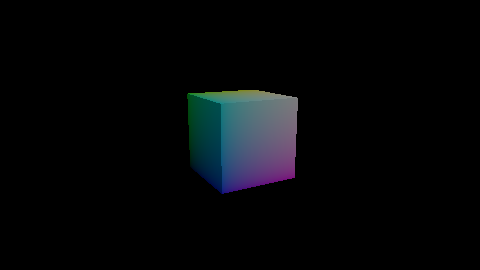
Run main: the cube turns once every six seconds or so, lit from one side.
How it works
Each frame, the scene runs your frame systems first, then the engine's own: TransformSystem turns
each Transform into a matrix, and RenderSystem3D draws every MeshRenderer from the primary
camera. That order is why Turntable only has to write a rotation.
When the app is disposed, the scene destroys the meshes and materials that assets { } built.
Asset names must match
requireMesh("cube") fails with "No scene mesh named 'cube' is registered" unless assets { }
declares a mesh with that exact name. The same holds for materials.
Fixed-step systems
frameSystem runs once per rendered frame. Use fixedSystem for simulation that must advance in
equal steps, such as physics.
See also
- Load a scene document: run the same scene from
first.scene.json. - Lights and shadows for the
lightcomponent. - ECS for components, queries, and systems.
- Scene authoring for the rest of the scene DSL.