shadcn components
Ready-made buttons, fields, menus, dialogs and layout blocks in the visual language of shadcn/ui, built on AwakeKt Compose. A theme you choose supplies every colour, radius and spacing.
module: awake:ui:shadcn
Vulkan
WebGPU
Desktop · Android · iOS · Web

Add com.awakekt.awake.ui:shadcn (catalog alias libs.awake.ui.shadcn) to commonMain. It brings
AwakeKt Compose Foundation with it. The components are ordinary AwakeKt Compose functions,
so everything on that page applies here.
Wrap your UI in a theme
Every shadcn component reads the theme in scope. Wrap the UI that uses them in
provideShadcnTheme(values) { … }.
provideShadcnTheme(shadcnThemeValues(dark = false)) {
    ShadcnButton("Save", modifier = Modifier.testTag("save"), onClick = { saves++ })
}
No theme, no component
A shadcn component outside provideShadcnTheme throws IllegalArgumentException. Its message starts
"No shadcn theme in scope. Wrap this content in provideShadcnTheme { }". There is no
fallback theme, so a missing provider fails where it is missing instead of drawing the wrong
colours.
Choose a theme
shadcnThemeValues(…) builds a complete theme from four choices.
val theme = shadcnThemeValues(
    preset = ShadcnStylePreset.Nova,
    baseColor = ShadcnBaseColor.Zinc,
    accent = ShadcnAccent.Blue,
    dark = true,
)
| Parameter | Type | Default | What it does |
|---|---|---|---|
preset |
ShadcnStylePreset: Vega · Nova · Maia · Lyra · Mira · Luma · Sera · Rhea |
Vega |
Base corner radius and spacing. Vega matches shadcn's new-york-v4 metrics. |
baseColor |
ShadcnBaseColor: Neutral · Stone · Zinc · Mauve · Olive · Mist · Taupe |
Neutral |
The grey scale behind every surface, border and text colour. |
accent |
ShadcnAccent: Base, or one of Amber · Blue · Cyan · Emerald · Fuchsia · Green · Indigo · Lime · Orange · Pink · Purple · Red · Rose · Sky · Teal · Violet · Yellow |
Base |
Replaces the primary colour, its foreground, and the focus ring. Base keeps the base colour's own. |
dark |
Boolean |
true |
Dark or light palette. |
The ShadcnTheme object is the default theme: Vega, Neutral, Base, dark. Wrap it as
ShadcnThemeValues(ShadcnTheme) to provide it.
Choose a density
Components take shadcn's own sizes by default. A dense UI, such as an editor, can ask for the next
size down once instead of passing a small size at every call. LocalShadcnDensity holds the density
for its content; it is ShadcnDensity.Default when nothing provides one, so a UI that never mentions
it is unchanged.
CompositionLocalProvider(LocalShadcnDensity provides ShadcnDensity.Compact) {
    ShadcnButton("Apply", modifier = Modifier.testTag("compact-default")) // 32 dp, as `Sm`
    ShadcnButton(
        "Apply",
        modifier = Modifier.testTag("compact-explicit"),
        size = ShadcnButtonSizeVariant.Lg, // 40 dp: a size passed here always wins
    )
}
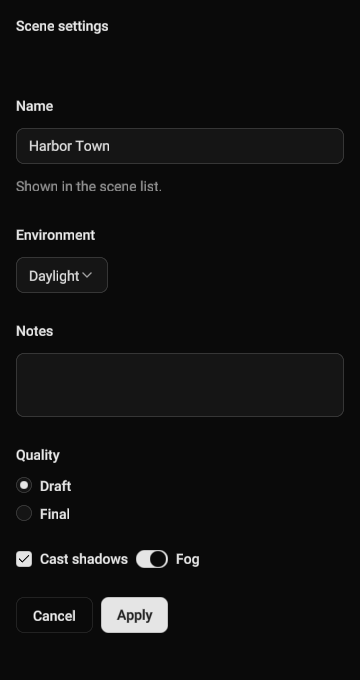
Default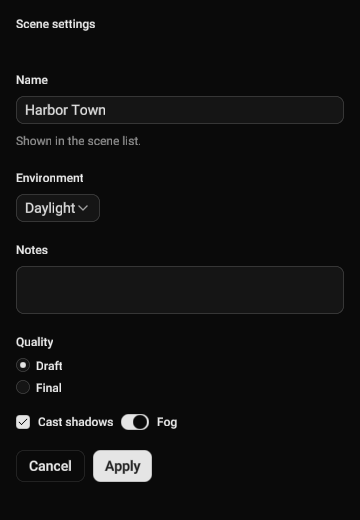
CompactOnly size and spacing change. Colours, radii and fonts are the theme's, and the one type change is
text-xs for form labels and descriptions where shadcn uses text-sm. A size you pass, such as
size = ShadcnButtonSizeVariant.Lg, always wins over the density.
| Component | Default |
Compact |
|---|---|---|
| Button, button group member | 36 dp (Default) |
32 dp (Sm) |
| Input, input group, combobox field | 36 dp, px-3 |
28 dp, px-2 |
| Textarea | at least 64 dp | at least 48 dp |
| Select trigger | 36 dp, px-3 |
28 dp, px-2 |
| Select, combobox, menu and context menu rows | 32 dp | 28 dp |
| Checkbox | 16 dp | 14 dp |
| Switch | 32 × 18 dp | 28 × 16 dp |
| Radio ring, option gap | 16 dp, 12 dp | 14 dp, 8 dp |
| Toggle | 40 dp | 32 dp |
| Toggle group item | 36 dp (Default) |
32 dp (Sm) |
| Tabs, every variant | 36 dp (Default) |
28 dp (Sm) |
| Table head, cell padding | 40 dp, p-2 |
32 dp, px-2 py-1.5 |
List item row (ShadcnItem, command palette) |
px-4 py-3 |
px-3 py-2 |
| Label, field label, field description | text-sm |
text-xs |
| Field, field group and field set gaps | 12, 28, 24 dp | 8, 20, 16 dp |
| Popover and hover card padding | p-4 |
p-3 |
The icon sizes (Icon, IconSm, IconXs) are always passed, so they stay as written: a dense UI
asks for IconSm or IconXs by name.
Read theme tokens
Inside provideShadcnTheme, shadcnTheme returns the theme in scope. Use its tokens instead of
fixed colours, so your own components follow the theme.
context(_: Composer)
fun StatusDot() {
    val theme = shadcnTheme
    Box(Modifier.size(12.dp).background(theme.palette.primary, theme.radii.full))
}
| Token group | Members |
|---|---|
palette |
background, foreground, primary, primaryForeground, secondary, secondaryForeground, muted, mutedForeground, accent, accentForeground, destructive, destructiveForeground, border, input, ring, card, cardForeground, popover, popoverForeground, sidebar and its roles, shadow, overlay |
radii |
xs (0.4 × base), sm (0.6 ×), md (0.8 ×), lg (the preset's base radius), xl (1.4 ×), full |
metrics |
panelPadding, surfacePadding, fieldPaddingX, fieldPaddingY, badgePaddingX, badgePaddingY, inputPaddingY, bandPaddingX |
config |
The preset, baseColor, accent and dark the theme was built from. |
shadow is a base tint: apply your own alpha. overlay is a complete scrim colour, ready to draw.
How it works
provideShadcnTheme puts the values in a CompositionLocal for its content. A nested
provideShadcnTheme wins inside its own content, and the outer theme returns after it closes. The
provider also sets the inherited text colour to palette.foreground, so plain Text inside it reads
on the theme's background.
Components hold the visual language: colours, radii, spacing and variants. Layout, drawing, input and semantics come from AwakeKt Compose Foundation. If your app needs a different look, build your own components on Foundation rather than overriding shadcn internals.
The module's components include alerts, avatars, badges, breadcrumbs, buttons and button groups,
calendars, cards, carousels, charts, checkboxes, comboboxes, commands, menus, dialogs, drawers,
fields and inputs, popovers, progress bars, radio groups, resizable panels, selects, sheets, sidebars,
sliders, switches, tables, tabs, toasts, toggles and tooltips. Each is a Shadcn* function in
com.awakekt.awake.ui.shadcn.components.
See also
- Button reference.
- UI with AwakeKt Compose for layout, state, hosting and tests.
- Game UI for a HUD stored in a scene.